How to start affiliate marketing without a website (method 2 of 2).
Recently I was reading through some questions on Quora, and I noticed one of the questions in the business section asked:

“ How can I start affiliate marketing without a website”?
This is the second article about how to start affiliate marketing without a website.
In order not to miss anything, please look for part one of this article so you can learn how to do affiliate marketing without a website using method 1.
Here is the video on youtube as well:
Now let’s begin:
Step 1: Create a niche-specific YouTube channel
If you haven’t done it already, create a niche-specific YouTube channel(from your Google account; don’t worry, you can create multiple) that revolves around a specific niche (like tech, music gear, audiophiles,etc.), and the lifestyle surrounding it.

Keep in mind that you will primarily use this new Youtube channel from your account to grow an audience that are big fans of the niche. That way you can put forward content that is interesting, and informative to them.
Additionally, remember that the channel needn’t be only reviews of products, but think about lifestyle, and related products that are complementary to the main audience of this group.
Step 1: Product research
First, we are going to find a good product that we want to promote and earn affiliate commissions from, which we know our audience will want to know more information about. In this method, we are going to utilize our channel on YouTube and the features of YouTube to promote this particular product.
When choosing the product make sure that you are familiar with the features and benefits of the product so you can prepare a script that clearly explains how this product is good for the audience of yours on YouTube.
For example, let’s use Apple Airpods Pro:

Step 2: Get your affiliate links
Now that we have selected our product, go to your affiliate program that is associated with the product we are going to be promoting. Sign in to the program and get the link associated with the product.

amazon associates logo
For this example, we are going to login to Amazon Associates, and search for the product “ Apple Airpods Pro”.
Now we want to collect as many links as possible that are variants, or associated with this product( you will see why down below”

amazon associates affiliate link Apple Airpods Pro
Step 3: Create a product review
Now what we want to do is to create a product review video. In this product review video, you are going to explain to your YouTube audience about what the pros and cons are of the headphones.
That way your audience will see you as a trusted source of information in their decision on these specific headphones. Don’t pull any punches.

If there was something specific to the product that you didn’t like: talk about it. You will be honest in your opinion about the product so as to create the trust that your audience has in your opinion.
Step 4: Call to action
Now that we have completed our YouTube review video that explains the benefits and features of the headphones as well as the pros and cons, we want to refer to our affiliate links in a call to action at the beginning of the video, as well as at the end or closing of the video.
Your call to actions to mention something like this:
“If you want more information about these “Airpods Pro”, be sure to click on the links in the description below“.
At this point save the video as “unlisted”, and now we’re going to start looking for keywords.
Step 5: Keyword research
So let’s look for some keywords to use throughout our headline, description, and tags. We want to utilize a couple of sources to do this. We are now going to need a couple of free tools to help us find good strong long-tail and short-tail keywords.
We want to utilize the search function on Pinterest and answer the public to find the most relevant keywords.
So first you want to start typing the first couple of letters for the product name, or what the product does(example: Airpods Pro), for our affiliate product into Pinterest and see what kind of pins are popular.
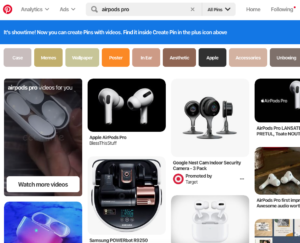
Pinterest search
This tells us that some of the most popular long-tail keywords related to Airpods Pro are: Airpods Pro and Airpods Pro case.
Next, we’re going to look at answer the public keyword tool to see what kind of long-tail keywords are attached to that product that we searched for in Pinterest.

Lastly, you want to use the Google keyword tool just to give you an idea of where those keywords are ranking in the Google search engine. That way it’ll give you an idea of what the strength of those keywords is and how much it might cost(bids).

Next, we are going to look for rankings for the keywords we found utilizing Pinterest and answer the public platforms.
We will then use our short and long till keywords that we found and explore them even further using the Google keyword planner tool.
This will tell us about how much competition that these keywords have due to their ranking.
Step 6: Write the description, and insert product links
After you make sure that you have those call to actions in your video and our new keywords, you’re going to write a description talking about the product and you’re going to utilize the keyword research.
Place your product in the description clearly, and add links to the product description line.

Protip: Consider adding different SKUs as line item links to different variations. Or associated products.
For example, we can add an affiliate link for Airpod Pro cases, since we know that they have a high search volume.
Now after you have done this do you want to go to change the status of this video to “public”.
And now that it’s public, you want to do one more thing: add a comment about why you made a video about this particular product and the review for it and leave your affiliate link there one more time.
For more content like this, visit:
The Postrepreneur Youtube channel
Theacespodcast.com/blog


0 Comments